

Student FAQs
Visit canvas.sandiego.edu from any web browser and enter your USDOne login username. Your password will be the same USDOne login password (you may be prompted by Duo Mobile security authentication).
Your Canvas profile photo is based on your Torero ID photo. If you update your photo on Canvas, the photo will revert to the Torero photo. Follow instructions from Campus Card Services for a permanent update.
You can get Canvas Help from within your Canvas portal. Within the Canvas portal: from the blue global menu, click on the Help icon to open the Help pane. The Help menu generates a list of resources to help you with Canvas, such as Canvas Student Resources at USD, the Canvas Student Guide, and more. You may find a faster response to your question by searching the Canvas Student Guide. But if you can't find an answer, or if you have questions about your access to Canvas or Banner you can reach out to help@sandiego.edu or call (619) 260-7900.
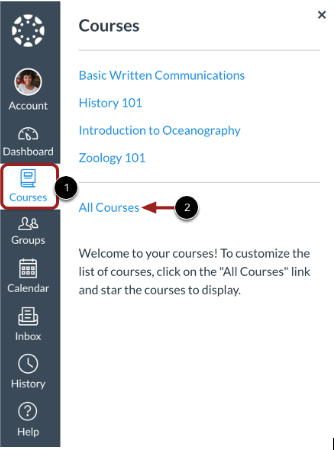
In Global Navigation, click Courses [1], then click All Courses [2]. In the Courses page, courses are organized alphabetically into All Courses, Past Enrollments, Future Enrollments, and Groups. Courses must be published by your instructor before you can access the course.
Grades are posted as soon as faculty post them within the semester grading window, depending on your program’s deadlines.