

Draft Coach is a feature in Google Docs designed to enhance students’ academic writing and research abilities by offering immediate feedback. It helps users identify and correct unintentional plagiarism, refine their citation techniques, and fix grammatical errors. For more information view: Understanding your Draft Coach reports
How to Enable Draft Coach
To use Draft Coach, log in to your USD Google account and open Google docs. Then do the following:
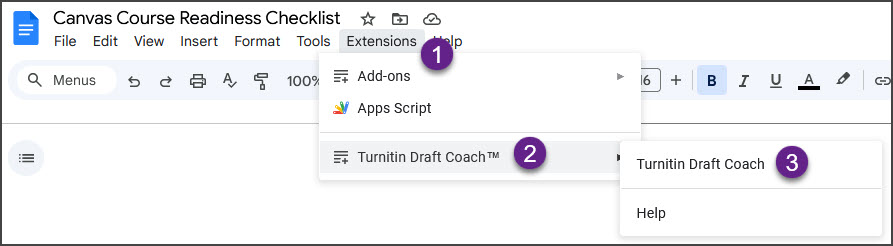
- In Google Docs, click on “Extensions” next to “Help”
- Select Turnitin Draft Coach™
- Select Turnitin Draft Coach again
A panel will open on the right, offering options for a Similarity Check, a Citation Check, or the Grammar Guide. Note: You can run the Similarity Check up to three times per paper.
If you need more help with enabling Draft Coach, view Adding Draft Coach to a Google Doc.