Beware of Recent Phishing SCAM, Money, and Job Request Message
There has been in increase in scam messages targeting students.
Always verify the message sender: While some phishing emails are sent from compromised USD accounts, in the past, ITS identified phishing emails sent from a compromised non-USD account masked as a USD student or employee.
Always verify the message subject and content: Decide if the subject information matches the content. If they don't match, specifically in email messages, it should be reported as phishing in your Gmail console. Do not click on any links in suspicious messages and never provide confidential information (e.g., passwords, bank accounts, credit cards, social security numbers, addresses, etc.). As a reminder, USD will never ask for your USD password.
Financial Transactions: If you become involved in a conversation with the sender and they discuss money or financial transactions, such as promises of financial gain, check transfers or deposits with your bank, or any money request for you to handle, stop responding immediately. A legitimate employer will never ask you to send money or be involved in financial transactions.
Here is how to report phishing: You should also Report Phishing email scams on your computer browser Gmail inbox by following the Report Phishing instructions. Alternatively, you can report phishing scams on any device to reportphishing@apwg.org, which is a government-based phishing reporting agency.
If you have any feeling of suspicion, are not sure of an email's details, or if you identify that an email is phishing, do not reply to the email and contact the ITS Help Desk (help@sandiego.edu) for assistance.
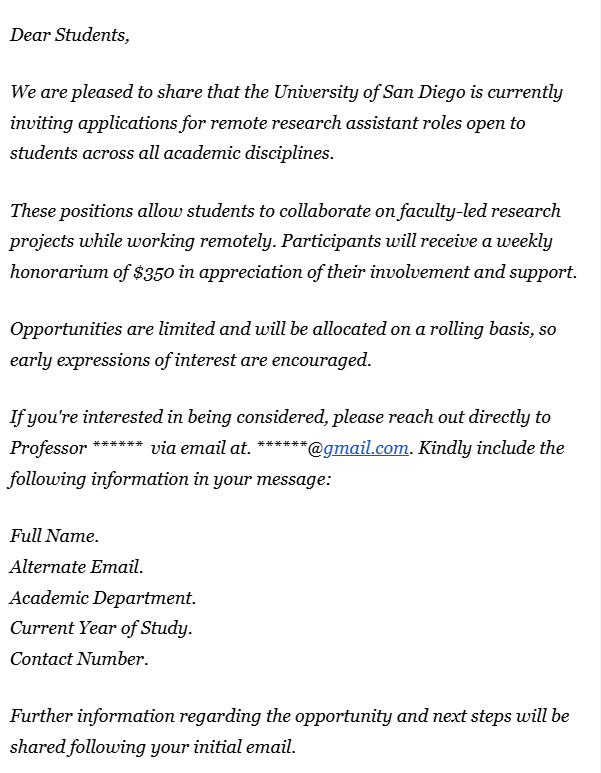
Below is an example of a SCAM message that was recently sent to students from a compromised USD account disguised as a faculty member regarding a fraudulent job opportunity.